What Is a Vector Database?

Storyblok is the first headless CMS that works for developers & marketers alike.
Most of us have learned a strange skill over the years: how to talk like a search engine. If you wanted to find something online, you didn’t just type your actual question into Google — you strategized. You shortened your query, trimmed away natural language, added quotation marks, removed filler words, and guessed which phrasing a machine might understand. You’d think, “Why does my laptop sound like it’s preparing for takeoff every time I open Chrome?” — but what you’d actually type into the search field would be something like: “laptop fan loud chrome fix.”
And it worked well enough. Keyword-driven search was fast, predictable, and built on systems designed to match text to text. As long as your query looked the way the system expected, you’d usually get something useful back.
But with the rise of AI tools, the way people search is changing. When you open ChatGPT or any AI assistant, you don’t think twice about phrasing your question naturally. You write the way you speak. You expect it to understand nuance, context, and intent — even if you can’t name a single keyword related to what you’re asking.
So how did we get here? How did we go from “speaking in keywords” to simply asking questions the way we would ask another person?
The answer lives under the hood. Modern AI tools retrieve and understand information in a completely different way than traditional search systems — and that difference starts with how the data itself is stored and represented.
At the center of that shift is a new kind of infrastructure: vector databases.
If you’ve ever wondered how AI tools manage to surface the right answer (even when your question is messy, vague, or extremely human), you’re in the right place. Let’s pull back the curtain.
Why traditional databases weren’t built for AI search
Before we get into vector databases, it helps to understand why the systems we’ve relied on for decades — relational databases — simply weren’t built for the kind of search that AI is doing today. These databases were designed for structured, literal information: rows, columns, IDs, metadata. Perfect for storing customer records or campaign budgets. Not so perfect for anything requiring nuance, context, or meaning. And while modern databases equipped with vector search capabilities can handle some semantic tasks, it’s important to understand that their underlying architecture wasn’t built to interpret or compare meaning — only labels.
You see this limitation the moment you try to search for something that isn’t purely textual or label-based. Imagine you’re running a content or ad performance audit and want to find assets similar to your best-performing creative — not identical, not with the same filename, but similar in tone, structure, layout, or “vibe.” In a relational database, you can’t ask:
“Find me assets that feel like this one.”
Because relational databases only understand the attributes you explicitly give them: filenames, dimensions, tags, formats, upload dates. They have no idea that two very different-looking creatives might convey the same mood, lean into the same color palette, or resonate with the same audience.
Humans see concepts; relational databases see labels.
That gap — called the semantic gap — is the disconnect between how people interpret information and how traditional systems store it. And once you notice it, it’s everywhere. A database can tell you when a file was uploaded, but it can’t tell you whether it “gives off the same energy” as the asset that crushed it in last quarter’s campaign. (Because yes, marketers absolutely search by energy and vibe.)
Unstructured, multi-dimensional data makes this even harder. Text, long-form articles, images, audio, video, brand assets, scripts, product specs — none of it fits neatly into rows and columns. And because relational databases have no representation of meaning, they can’t compare or retrieve content based on conceptual similarity. They can only look for literal matches.
And that’s the core issue: traditional databases can’t power AI-style search. AI isn’t looking for overlapping tags — it’s looking for relationships, patterns, themes, and context. And to do that, it needs a completely different way of representing and retrieving information.
What is a vector database?
If traditional databases organize information using rows, columns, and explicit labels, a vector database does something fundamentally different: it organizes information by meaning.
Instead of storing data under fields like title, tags, or author, a vector database stores each item as a vector embedding — a mathematical representation of the item’s semantic content. If that sounds abstract, don’t worry, we’ll break it down in the next section.
This design allows vector databases to handle all kinds of unstructured data. The difference shows up during retrieval:
- Keyword search finds exact or near-exact text matches.
- Vector search finds things that are conceptually similar — even when the words, formats, or file types differ completely.
Because embeddings capture relationships and concepts rather than literal strings of text, a vector database can surface content that’s semantically related even if it shares zero overlapping keywords.
This is what makes vector databases the backbone of modern AI search: they store millions (or billions) of embeddings and retrieve the closest semantic matches in milliseconds.
If you're interested in what an example vector looks like or a semantic meaning map, we have a more technical guide on vectors for developers.
How Vector Embeddings Work
Because vector databases store numerical representations of meaning, they rely on a special type of representation called a vector embedding. Let’s figure out what that actually means.
What is a vector embedding?
A vector embedding is a numerical representation of data — a structured array of values that encodes the semantic features of the input. If two items are similar in meaning, their vectors will be located near each other. If they’re different, they’ll sit farther apart.
That simple idea — semantic distance — is what makes similarity search possible.
How embeddings are created
Embeddings are generated by embedding models trained on massive datasets. These models learn to recognize patterns and extract meaning from different types of content.
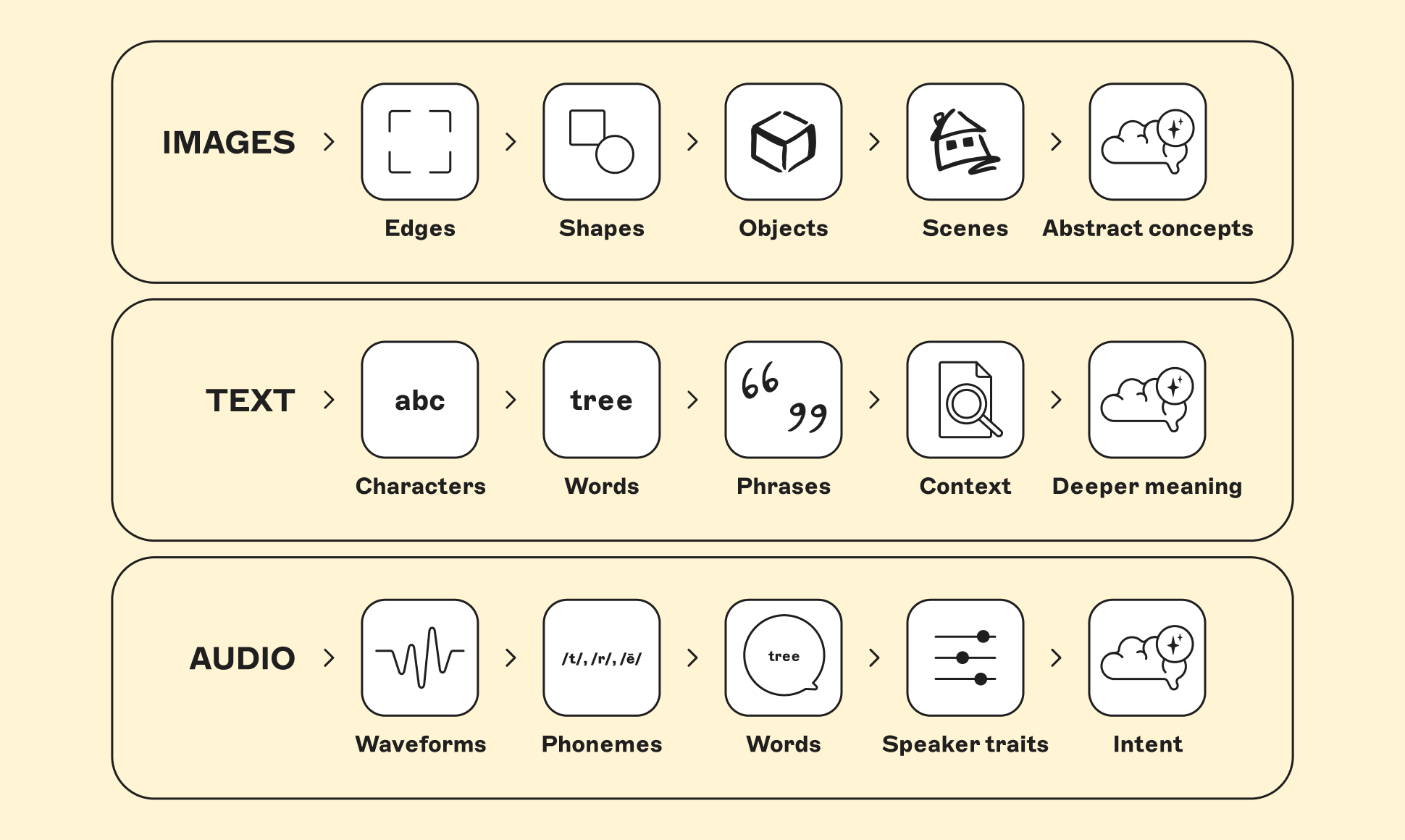
They do this in layers:
- Images: edges → shapes → objects → scenes → abstract concepts
- Text: characters → words → phrases → context → deeper meaning
- Audio: waveforms → phonemes → words → speaker traits → intent
That’s where vector indexing comes in — the technique vector databases use to narrow the search space and surface the most relevant vectors fast. Instead of checking every single vector, they use Approximate Nearest Neighbor (ANN) methods that zero in on the closest matches.
These approaches sacrifice a tiny bit of precision for a massive gain in speed — making semantic search, real-time recommendations, and fast RAG retrieval possible at scale.
Examples of embedding models include:
- CLIP (images)
- wav2vec (audio)
- GloVe, BERT, OpenAI embeddings (text)
The deeper the layer in the model, the more abstract and semantically rich the representation becomes.
What embeddings actually look like
In practice, embeddings are hundreds or thousands of numbers long. Each number contributes to a dimension in vector space.
To give you a marketing example, if you embed two blog posts — one about “email deliverability tips” and one about “how to improve newsletter open rates” — their vectors will land close together, even though they share almost no identical phrases. Embeddings capture the shared meaning, not the shared wording.
Individual dimensions aren’t human-interpretable — but the relationships are:
- Close together = similar meaning
- Far apart = different meaning
This is what allows vector databases to retrieve “similar” content in ways traditional databases never could.
How vector databases perform semantic search
Once your data is stored as embeddings, vector search works through a simple but powerful flow. When a user enters a query — whether it’s a sentence, an image, or a snippet of audio — the system first converts that input into its own embedding. That query vector is then compared against the vectors stored in the database to find the closest matches.
Under the hood, this comparison happens in a high-dimensional space. Each embedding might have hundreds or thousands of dimensions, and a vector database may contain millions of them. Comparing every dimension of the query against every vector in the system would technically work — but it would also be far too slow to support real-time search.
Get a deeper, more technical breakdown of vector indexing — including ANN, HNSW, and IVF — in this overview of how vector databases work.
Vector databases in AI Search (RAG)
So far, we’ve looked at how vector databases store meaning and retrieve semantically similar content. RAG — Retrieval-Augmented Generation — is the framework that puts all of that to work inside modern AI systems.
RAG does two things at once:
- retrieves the most relevant information using a vector database, and
- generates a natural-language answer using an LLM.
RAG is the bridge between your data and the model’s reasoning. Here’s how it works:
- Chunk your content
- Turn each chunk into an embedding
- Store all those vectors in a vector database
- A user asks a question
- The vector database retrieves the closest-meaning chunks
- The LLM uses those retrieved chunks to generate an answer
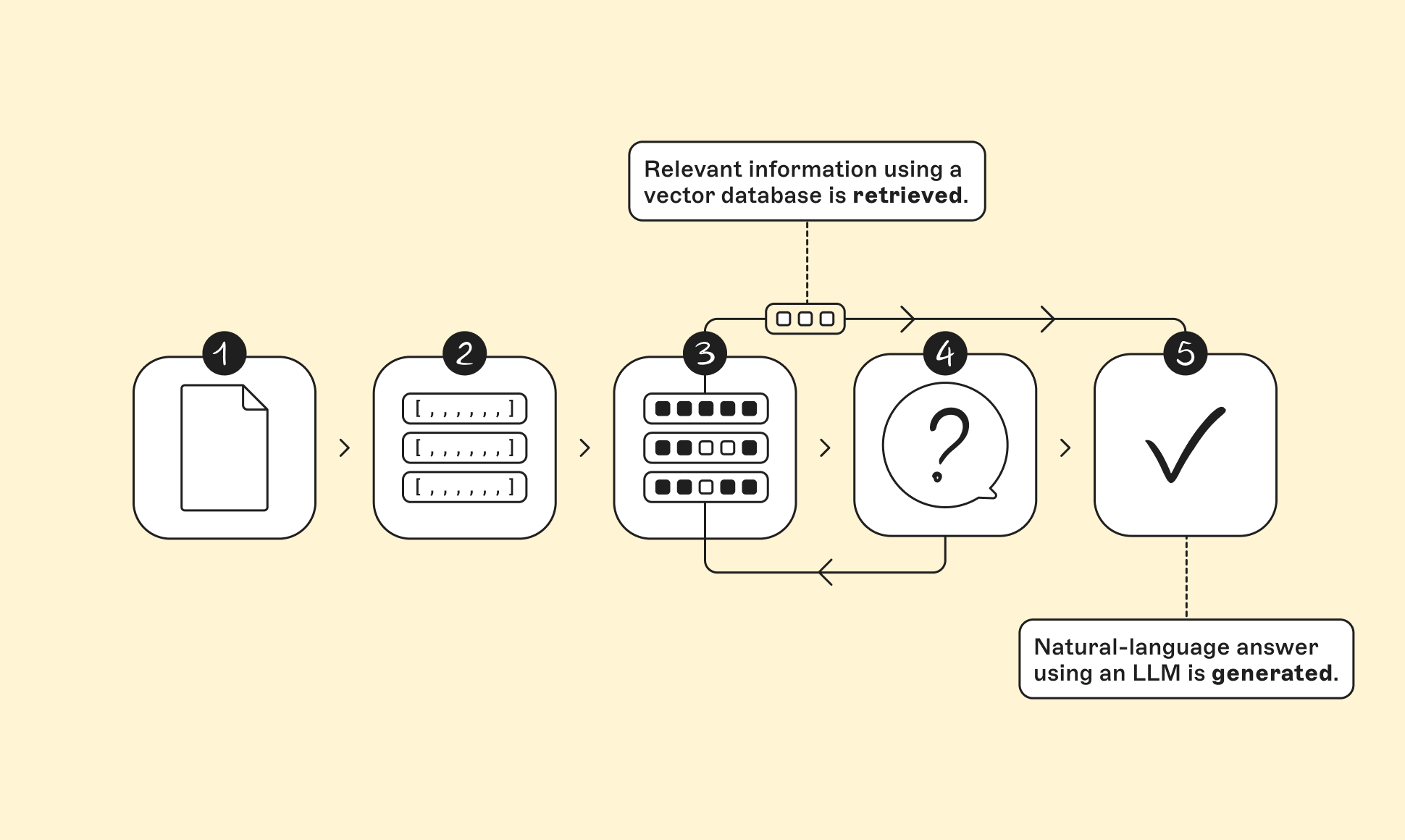
Together, these steps turn your content into a searchable, interpretable knowledge layer that an AI model can reliably draw from — instead of guessing or hallucinating.
Why this matters for marketers, SEO managers, and developers alike
- Marketers can build AI tools that pull accurate answers from brand assets, product descriptions, competitor research, and campaign data.
- SEO managers can create semantic site search experiences that understand intent instead of relying on limited keyword matches.
- Developers can build AI assistants, knowledge bases, chatbots, and internal tools that scale without rewriting everything into rigid metadata.
In other words: RAG gives AI access to your current information — and vector databases make that retrieval super fast and much more accurate.
What vector databases enable
Once you have a system that stores information by meaning instead of literal text, an entirely new world of capabilities opens up. Vector databases sit at the center of many AI-powered tools you’re already using — and many more that marketers, SEO managers, and developers are starting to build.
Here’s what they make possible:
1. Semantic search that feels intuitive
Instead of relying on exact keywords, vector databases return results based on the concepts behind the query. Ask “show me templates for chaotic project timelines,” and you’ll surface content that captures the idea — not just the words — especially when combined with traditional keyword search.
2. AI chatbots that actually “know” your content
When paired with RAG, vector databases let an AI assistant pull relevant information from your docs, knowledge base, product pages, blog posts, support tickets — anything. The result: chatbots that answer questions accurately using your data, not hallucinations.
3. “Find more like this” for creative and content teams
Whether it’s brand assets, ad creatives, blog posts, or user-generated content, vector search can surface items with similar tone, structure, style, or “energy.” This is massively valuable for audits, repurposing, and scaling creative production.
4. Smart recommendations
Because embeddings cluster similar items together, vector databases power recommendation systems that go well beyond “people who clicked X also clicked Y.” They can detect conceptual similarity, not just user behavior patterns.
5. Deduplication, clustering, and organization at scale
When millions of assets, documents, or datasets live in your system, vector databases can automatically group things by meaning and even flag near-duplicates — without relying on filenames or metadata.
6. Cross-media search
Text-to-image search, audio-to-text search, video-to-image similarity — these become possible when different formats are encoded into vectors that share the same space. That shared space is what enables truly multimodal AI experiences.
7. Enterprise search that understands intent
Across product docs, internal tools, repositories, assets, customer communications — vector search makes enterprise knowledge actually discoverable. Intent becomes the search input, not keywords.
How Storyblok's Strata fits into this picture
Strata brings vector-based content intelligence directly into Storyblok. Through its Semantic Search API, it lets teams search by meaning — not exact words — which makes it easy to surface the right content instantly, even when phrasing differs.
This vector layer can power smarter on-site search, more accurate chatbots, better recommendations, and AI-driven personalization. When someone asks, “Show me 2024 product updates for enterprise customers,” Strata can return feature releases, case studies, and related articles — not just exact keyword matches.
Because Strata works with Storyblok-approved, structured content, responses stay grounded, on-brand, and context-aware. It also automates tagging, keeps content accessible and compliant, and helps external AI tools retrieve verified, semantically rich information.
In short, Strata is a new AI-powered intelligence layer for your content — one that unlocks smarter search, richer context, and seamless integration with any AI model or workflow.


