Building a Custom Calendar with React + Storyblok: A Recap of Our Bryntum Integration Tutorial

Storyblok is the first headless CMS that works for developers & marketers alike.
At Storyblok, we love collaborating with teams building exceptional frontend experiences. Recently, we partnered again with Bryntum to bring you a hands-on tutorial on creating a custom Bryntum Calendar React component for Storyblok. This guide is great for React developers who want to integrate advanced UI components without building them from scratch, and for Storyblok users to make their interfaces mode dynamic and content-driven.
To follow along, you will just need a basic React setup (React 18+), a Storyblok space with the React SDK, and access to the Bryntum Calendar (trial or license). Once you have these in place, the tutorial walks you through connecting structured Storyblok content to a fully-featured calendar UI in a straightforward and developer-friendly way.
Dive straight into the tutorial: Check out the complete guide on Integrating Bryntum Calendar + Storyblok + React Component
Why Bryntum + Storyblok works so well
Bryntum builds high-performance visual UI components, ****including calendars, schedulers, and Gantt charts, that solve problems developers rarely want to rebuild from scratch. A calendar UI, in particular, hides a surprising amount of complexity: time zones, navigation, layouts, event logic, conflict resolution… the list goes on.
Storyblok complements this perfectly with its headless CMS, offering structured content, visual editing, and a schema that adapts to whatever your project needs.
Together, they give you:
- A fully functional calendar interface powered by Bryntum
- A content-driven configuration layer using Storyblok
- A smooth React developer experience with the Storyblok React SDK
It’s the best of both worlds: editors manage content, while your components handle the logic.
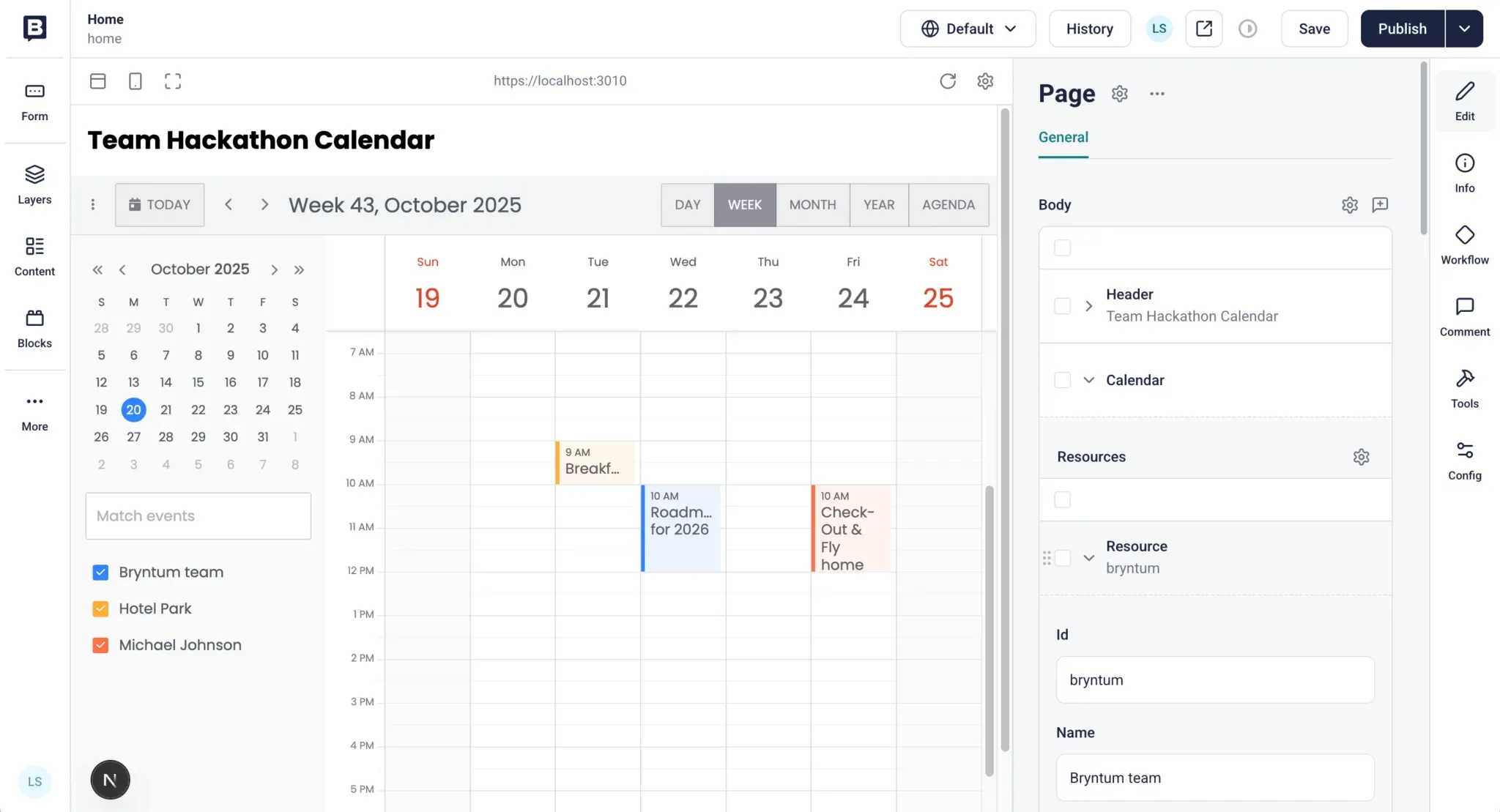
What you'll learn in Bryntum’s tutorial
This tutorial walks you step-by-step through building a working calendar UI using React, Storyblok, and Bryntum Calendar. Here’s what you’ll take away:
1. A Ready-to-Use Calendar Component
Bryntum handles layout, event rendering, drag-and-drop interactions, and multiple views so you can focus on integrating, and not rebuilding the core functionality.
2. Fetching and Rendering Storyblok Content in React
You’ll learn how to work with Storyblok’s React SDK using:
useStoryblokStateapiPlugin- a custom Storyblok client
These help you connect Storyblok entries (like Events or Calendars) directly to Bryntum’s configuration.
3. Mapping CMS Content to Bryntum’s Data Model
Bryntum Calendar expects a specific schema. The tutorial shows how to map Storyblok’s structured content to Bryntum’s data stores, an essential skill when building headless, UI-heavy applications.
4. Using Storyblok’s Visual Editor With Custom Components
You’ll integrate your calendar into the Visual Editor through the StoryblokComponent renderer so editors can preview updates instantly.
5. A Clean, Reusable Integration Pattern
By the end, you’ll have a self-contained React component that reads from Storyblok and renders a fully interactive Bryntum calendar. No hacks. No unnecessary complexity. Just a clean, scalable pattern you can reuse across projects.
Why this matters for developers
Building a production-ready calendar UI is notoriously difficult and maintaining it is even harder.
This tutorial gives you:
- A battle-tested calendar component you don’t need to rebuild
- A consistent data flow powered by Storyblok
- A scalable integration pattern you can apply to other Bryntum components
- A way to empower editors without sacrificing structure or performance
If you're building dashboards, booking systems, internal tools, or anything time or event-based, this integration gives you a huge head start.
Ready to try it out?
If you want to explore how Storyblok and Bryntum work together in a real project, this tutorial is the perfect starting point. Try the build yourself, explore the code, and experiment with your own content types. You’ll learn a lot along the way.
Resources & links
- Read the full tutorial: Creating a custom Bryntum Calendar React component for Storyblok.
- Explore the completed code: GitHub repository for the tutorial.
- Join the Storyblok Discord Community: Connect with other developers working on exciting projects.
- Read the earlier guide: Building a Bryntum Gantt UI component with React and Storyblok.


